

We used OpenClaw for SEO in several projects to automate and speed up keyword research, write content faster, and rank higher.
Here's everything we learned: what actually works, common mistakes, and best practices. Also, you'll learn why it's better than ChatGPT or Claude, and how to set it up.
Why use OpenClaw for SEO instead of ChatGPT or Claude
ChatGPT alone has 78.16% market share in the AI industry, so why bother to learn even another tool?
The reason is the incredible results and faster speed you get with OpenClaw.
Take a look at this quick comparison:
| Feature | OpenClaw | ChatGPT / Claude |
|---|---|---|
| Memory | ✅ Persistent (stop repeating yourself) | 😅 Limited and unpredictable |
| Connect tools | ✅ Any | 😅 Limited |
| Control over your data | ✅ Absolute (self-hosted) | 😅 You can opt out of training models with your data (if you trust that...) |
| When it works | ✅ Whether you're online or not (runs on a server) | 😅 When your laptop is on (runs on your laptop) |
| Schedule tasks | ✅ Yes, you don't need to be there | 😅 Can't, is limited and often fails |
| Interface | Chat tools (WhatsApp, Telegram, Slack, Discord...) | Web app, desktop app |
| Cost | ✅ A few $10s per month | 😅 At least hundreds of $$ with traditional SEO tools) |
Want an example?
Imagine every Monday at 8 AM you get a WhatsApp message with the new articles your competitors published last week, your pages by growing and declining traffic, and a list of main articles to revamp to reach your monthly goals.
Good luck doing that with Gemini or other tools (hint: you shouldn't).
The world is moving from AI chatbots to AI agents, and OpenClaw is the most popular and fastest-growing one, with over 357,000 stars on GitHub.
How to set up OpenClaw: Fast and safe method
You could install OpenClaw on your laptop, but that's unsafe when implementing an autonomous AI agent. Also, your agent goes to sleep the moment you close your laptop.
So what are good options?
Many people are buying a Mac mini, but that's an upfront minimum cost of $599 USD, and you can't get started immediately.
That's why the best approach, which is both safe and fast, is installing OpenClaw in a VPS (Virtual Private Server).
My personal VPS recommendation is Hostinger because they offer a one-click OpenClaw setup, it's cheap (starting at $6.29/mo), and they're more transparent with their pricing than most alternatives.
Here you have a quick video tutorial that's quite complete:

It covers how to get your VPS, integrate with AI tools, use the OpenClaw dashboard, connect to a communication tool, test it, and verify everything works.
Also, it overviews how to ask OpenClaw to do tasks for you, as well as creating backups so that you protect your data from accidental errors and other problems.
Next, let's see how to start doing SEO with OpenClaw.
Use OpenClaw skills to automate SEO
Think of OpenClaw as an intern. You can't just hire it, give no training, and expect amazing results.
So, how do you train your digital intern? That's exactly what Skills do.
A skill is basically a folder you drop into your project's skills/ directory that contains guidelines and resources to guide your agent to perform specific tasks.
They follow the AgentSkills protocol, which looks look what you see below.
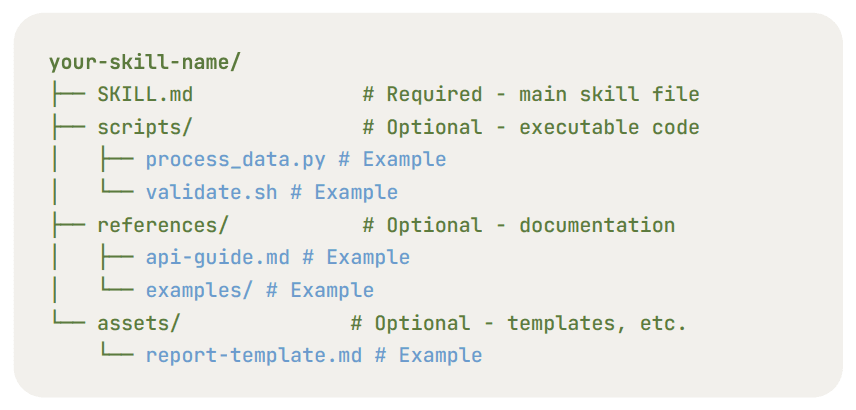
You can grab a skill that someone else already built and tested (best to get started) or write your own from scratch (you can check out Anthropic's guide to building skills).
How to install a skill
Option A: The typical method is via terminal.
openclaw skills install <skill-name>Option B: You can also ask your agent directly in a chat.
Please install skill <skill-name> using ClawHub.Option C: Manually.
Download the skill folder from the internet and move it to your workspace directory (<project>/skills/).
Where to find ready-to-use skills
Browse ClawHub (the official skill registry with over 3,200 skills).
Alternatively, check out VoltAgent's list to find community-recommended options.
Now, it's time to start automating tasks.
Common OpenClaw SEO use cases
Step 1: Automate keyword research
Here's the content workflow we use and professional SEO teams follow:
- Figure out what content is worth creating.
- Research the topic deeply.
- Create outline.
- Write article (given research and style guidelines).
- Review article (grammar check, etc.).
- Publish.
The first step, figuring out what to write, is the one most people get wrong. They use traditional keyword tools to find what gets search volume. But there's a better question to ask:
What if you could know what content is generating revenue for your competitors?
Not just traffic. Revenue. That's what HeyCompetitor tells you, and we use it together with OpenClaw to do a competitor gap analysis.
Here's the prompt, which you can copy-paste in your chat with OpenClaw:
Browse to heycompetitor.com, sign up for free and check what content is
driving revenue via SEO and AI visibility for my main competitors.

These are my main competitors:
- [company1.com]
- [company2.com]
- [company3.com]

After that, filter out the ideas I have already written about in [mywebsite.com].

Then, deliver a report to me.
Step 2: Write articles, optimized for search engines
Once you know what to write about, you can use the SEO Writer skill. You'll just need to provide some basic details: target keywords, search intent, audience, word count, and brand tone. It's a starting point to get your hands dirty.
However, I'll be very clear about this: You should NOT jump straight to asking your AI SEO agent to write the articles. Because if you do, this is what will happen:
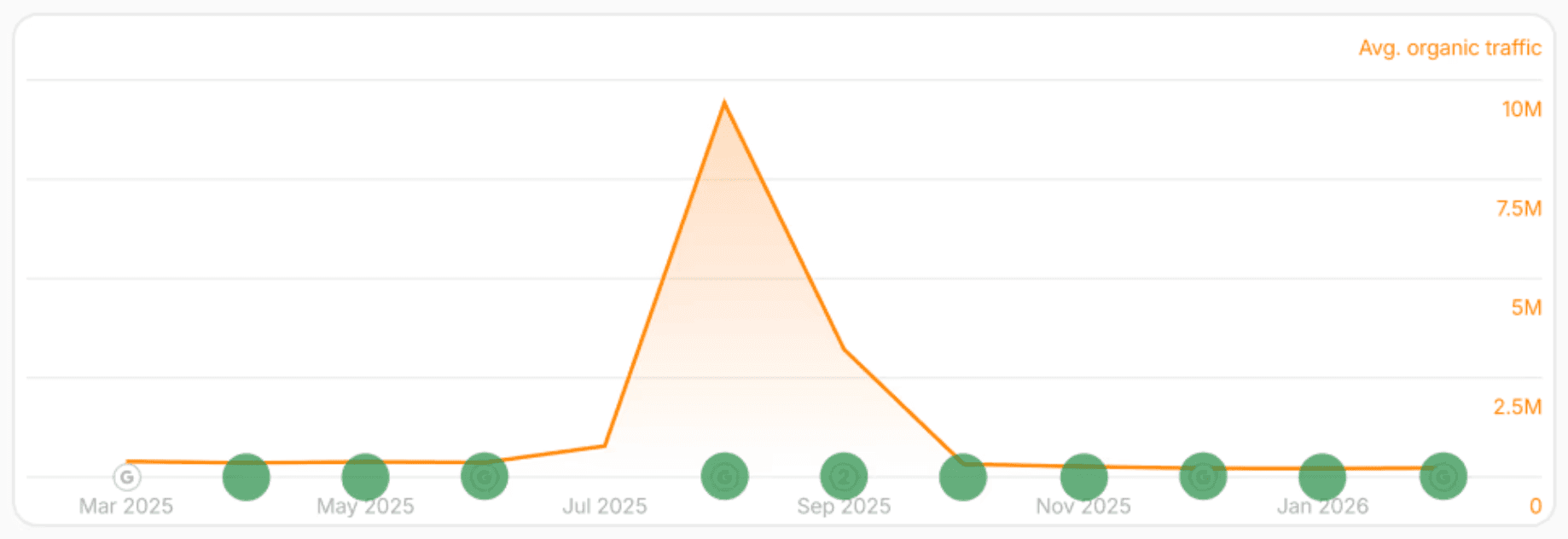
Google will quickly flag all your content as trash and will blacklist your website. Total fail.
To prevent that from happening, you need to do deep research about the topic before writing anything.
The Write skill puts much more emphasis on research before writing: scraping competitors, identifying content gaps, and gathering data before writing the article.
That said, human-written content is 8x more likely than AI to rank #1 on Google. So if we were you, trying to build a business and consistently rank high, we'd pay for human writers, and let OpenClaw do what it does best: analysis, research, and reporting.
Don't believe what you see on social media. People get money with your attention and sell you courses and so. They don't have an interest in telling you the full truth.
Step 3: Create a content brief before writing
A content brief is an outline that tells a writer (human or AI) what an article needs to cover, who it's for, and how it should be structured.
In my experience generating over $8M with SEO, content briefs are what sets and keeps quality high, especially when your search engine optimization team is not just you.
Here's a useful prompt to get started with outlines:
Research the top 10 Google results for [target keyword].

For each result, extract all h2 and h3 headings, the approximate word count, and the main points of the section.

Also, consider important aspects that [your audience] would benefit from learning but don't appear in the current search result pages.

Then, create a content brief that includes: target keyword, search intent, recommended heading structure, target word count, and 3 internal linking opportunities from [your website].
Step 4: Avoid sounding like it was written by AI
Compare these article introductions and tell me what article you'd prefer to read:
- Generic AI: "Project management tools are essential for modern teams"
- Real experience: "After migrating our 12-person remote team from AAA to BBB last quarter, our sprint completion rate went from 60% to 85%."
It's usually easy for a human to know a content has been fully or partially written by AI.
The same happens to Mr. Google, who has a patent on detecting AI-witten content based on LLM patterns.
Those patterns in generic AI writing are overusing specific transition words, lack of specific examples, and so on.
This is challenging because Google will either flag you easily, or its manual reviewers will give you a low rating (Google's Quality Rater Guidelines use the E-E-A-T assessment framework, i.e. Experience, Expertise, Authoritativeness, Trustworthiness).
Content without real human experience will struggle more, and be in a weaker position when Google Search's algorithm changes.
But for the sake of pure education, here's a prompt to help:
Review the below article to identify, remove or rewrite AI writing patterns:
- Remove filler transitions.
- Replace generic statements with specific examples or data points.
- Vary sentence length and structure (mix short sentences with longer ones).

<your article>
Step 5: Research LLM prompts for AI SEO
Getting mentioned and cited in AI answers is becoming more important, as traditional web traffic keeps dropping and most internet visitors are bots since 2024
But how do you achieve that?
This might be counterintuitive, but there's a high correlation between SERPs and answers from LLM. For example, 75% of Google AI Overview links come from the top results in the organic rankings.
In other words, if you rank in traditional SEO, you'll also rank for AI SEO (aka GEO).
But to get more visibility, here are two approaches to find the prompts that matter for your brand:
Option A: Discover prompts based on your website (free).
AEO Prompt Research skill: it uses your website URL as input, then checks out your website, and gives you an educated guess on what AI prompts and topics are relevant for your company using free tools.
Option B: Analyze what AI actually searches for (paid).
AEO Prompt Frequency Analyzer: It takes a specific LLM prompt (like best shoes summer) and asks Gemini about it several times, with the Google Search feature enabled. The agent then intercepts Gemini's SERP queries and tells you the most frequent ones.
This matters because the queries AI tools use to find information influence AI answers.
Step 6: Discover and fix technical SEO issues
Technical SEO is your content infrastructure. Because if you have great content but your site takes 8 seconds to load, users will get back to results page, and Google will penalize you.
200 broken internal links? Multiple h1 tags in the same pages? And so on.
OpenClaw listed a technical SEO audit skill to help you with these matters.
You can schedule it to run it weekly, and only bother you if it finds important issues. For example, you could set a threshold of 100 broken links.
And for page speed, the frontend performance skill will help you the most.
It uses Lighthouse (a programmatic way to use Google PageSpeed Insights) and other tools to find improvement points. For example, when websites are built on top of Next.js, it uses the @next/bundle-analyzer module.
Step 7: Create programmatic SEO pages
Let's say your SaaS integrates with 50 other apps and you want to let the world know about that.
You could write one generic Integrations page, which will likely get no organic traffic... or write 200 individual pages: "Connect [your tool] to Gmail," "Connect [your tool] to Slack", etc. Each page would target a long-tail keyword that people are searching for.
But you need to create many because a single page would bring you little traffic. And creating a ton of them one after the other would be overkill. That's why the best approach is programmatic SEO (pSEO).
Zapier does it for integrations, Wise for currency conversion, and the system is the same: create a template, include data or a mini-tool, and publish at scale.
The Programmatic SEO skill for OpenClaw might be helpful for you to create your first pSEO project or do it faster than before.
Conclusion
We've seen OpenClaw's advantages for SEO, how to set it up from beginning to end, and how to use it for common use cases, such as keyword research, content briefs, and writing drafts.
Most people aren't using this tool yet, so you can use it to outperform your competitors.